Objects

The master data CertiReplica replicates, and what is proven

32 kinds of master data replicate, and 4 more are mapped between companies without ever being copied. This list is generated from what the product itself reports, the same list as its Catalogue screen and its manual. 29 objects are marked Proven: each was created and updated end to end on a real SAP Business One system.

  • ProvenCreated, run again, updated and run again through the Service Layer on a real SAP Business One 10.0 system on SAP HANA.
  • PreviewDescribed from the Service Layer's own data, not yet written end to end on a real system. Simulate first and check the result before you rely on it.
  • Mapped onlyBelongs to each company and is never copied. You say under Mappings which record of one company is which record of another.

Inventory

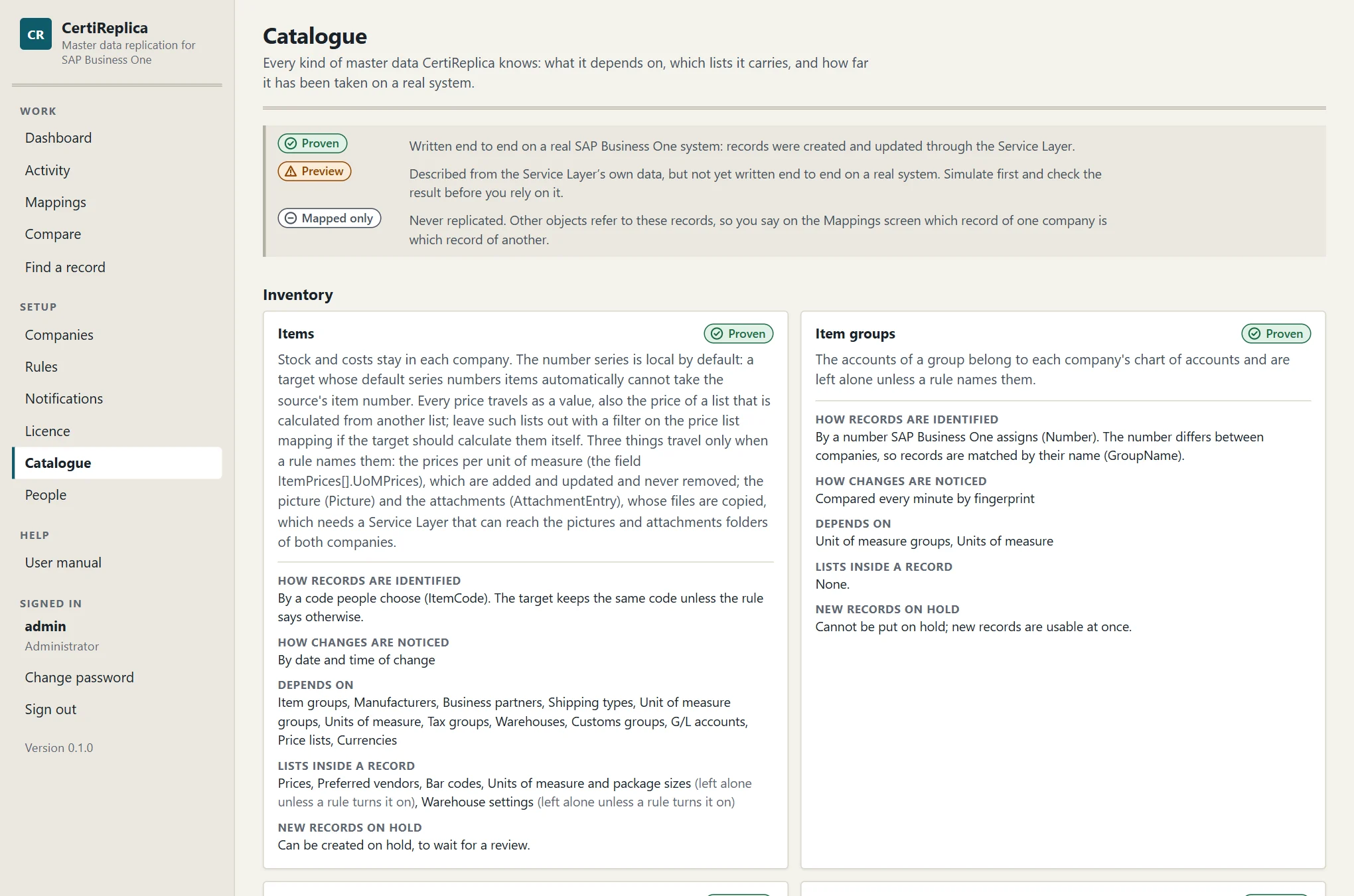
Items

Proven

Stock and costs stay in each company. The number series is local by default: a target whose default series numbers items automatically cannot take the source's item number. Every price travels as a value, also the price of a list that is calculated from another list; leave such lists out with a filter on the price list mapping if the target should calculate them itself. Three things travel only when a rule names them: the prices per unit of measure (the field ItemPrices[].UoMPrices), which are added and updated and never removed; the picture (Picture) and the attachments (AttachmentEntry), whose files are copied, which needs a Service Layer that can reach the pictures and attachments folders of both companies.

Recognised
By a key people choose (ItemCode)
Changes noticed
By date and time of change
Lists inside a record
Prices, Preferred vendors, Bar codes, Units of measure and package sizes (off until a rule turns it on), Warehouse settings (off until a rule turns it on)
New records on hold
Yes
Refers to
Item groups, Manufacturers, Business partners, Shipping types, Unit of measure groups, Units of measure, Tax groups, Warehouses, Customs groups, G/L accounts, Price lists, Currencies
Item groups

Proven

The accounts of a group belong to each company's chart of accounts and are left alone unless a rule names them.

Recognised
By a number SAP Business One assigns; matched between companies by GroupName
Changes noticed
Compared every minute by fingerprint
New records on hold
No: SAP Business One has no hold for this object
Refers to
Unit of measure groups, Units of measure

Manufacturers

Proven
Recognised
By a number SAP Business One assigns; matched between companies by ManufacturerName
Changes noticed
Compared every minute by fingerprint
New records on hold
No: SAP Business One has no hold for this object

Units of measure

Proven
Recognised
By a number SAP Business One assigns; matched between companies by Code
Changes noticed
Compared every minute by fingerprint
New records on hold
No: SAP Business One has no hold for this object

Unit of measure groups

Proven
Recognised
By a number SAP Business One assigns; matched between companies by Code
Changes noticed
Compared every minute by fingerprint
Lists inside a record
Conversions
New records on hold
No: SAP Business One has no hold for this object
Refers to
Units of measure

Warehouses

Proven

Accounts, location and branch of a warehouse are local by default.

Recognised
By a key people choose (WarehouseCode)
Changes noticed
Compared every minute by fingerprint
New records on hold
No: SAP Business One has no hold for this object

Shipping types

Proven
Recognised
By a number SAP Business One assigns; matched between companies by Name
Changes noticed
Compared every minute by fingerprint
New records on hold
No: SAP Business One has no hold for this object

Customs groups

Proven
Recognised
By a number SAP Business One assigns; matched between companies by Name
Changes noticed
Compared every minute by fingerprint
New records on hold
No: SAP Business One has no hold for this object

Pricing

Price lists

Proven

This is the definition of a price list. The prices themselves travel with the items.

Recognised
By a number SAP Business One assigns; matched between companies by PriceListName
Changes noticed
Compared every minute by fingerprint
New records on hold
No: SAP Business One has no hold for this object
Refers to
Currencies

Special prices for business partners

Proven

A special price is the price of one item for one business partner, so both must exist in the target; it is found there under the target's own codes for them. A price that follows its price list (‘Auto’) is worked out by each company from its own price list, so the target may hold another amount for the same discount. The quantity steps of a period travel with it: they are added and updated, never removed. Period and volume discounts of a price list are left out.

Recognised
By a key people choose (ItemCode and CardCode)
Changes noticed
Compared every minute by fingerprint
Lists inside a record
Periods
New records on hold
No: SAP Business One has no hold for this object
Refers to
Items, Business partners, Price lists, Currencies, Units of measure

Discount groups

Proven

A discount group belongs to one business partner, to a customer or vendor group, or to all business partners, and is found in the target by that. Each of its lines gives a discount for an item group, an item, a manufacturer or an item property; what a line points at must exist in the target.

Recognised
By a key people choose (Type and ObjectCode)
Changes noticed
Compared every minute by fingerprint
Lists inside a record
Discounts
New records on hold
No: SAP Business One has no hold for this object
Refers to
Business partners, Business partner groups, Item groups, Items, Manufacturers

Production

Bills of materials

Proven

The parent item and every component must exist in the target; let the rule create missing items or replicate items first.

Recognised
By a key people choose (TreeCode)
Changes noticed
Compared every minute by fingerprint
Lists inside a record
Components
New records on hold
No: SAP Business One has no hold for this object
Refers to
Items, Price lists, Warehouses, Projects, Distribution rules, Currencies, G/L accounts

Resources

Proven

Machines, labour and other resources of production, with their costs and daily capacities. The number series, the default warehouse, the linked item and whether the resource is active or inactive are local by default. The warehouses of a resource are left alone unless the rule turns that list on: SAP Business One usually adds every warehouse by itself.

Recognised
By a key people choose (Code)
Changes noticed
Compared every minute by fingerprint
Lists inside a record
Daily capacities, Warehouses (off until a rule turns it on)
New records on hold
No: SAP Business One has no hold for this object
Refers to
Resource groups, Warehouses, Items

Resource groups

Preview
Recognised
By a number SAP Business One assigns; matched between companies by Name
Changes noticed
Compared every minute by fingerprint
New records on hold
No: SAP Business One has no hold for this object

Human resources

Employees

Proven

An employee is recognised in the target by last name and first name together, so two people with the same names cannot be told apart: give one of them a middle initial in the first name. Private and payroll data (home address, date of birth, identity and passport numbers, bank details, salary, tax and insurance) never leaves a company unless a rule names the field. The manager, the position, the status and the SAP user are numbers of one company and are local by default. The lists of an employee (absence, education, reviews, roles) stay in each company.

Recognised
By a key people choose (LastName and FirstName)
Changes noticed
Compared every minute by fingerprint
New records on hold
Yes
Refers to
Departments, Branches of employees, Sales employees and buyers, Cost centres, Business partners

Departments

Proven
Recognised
By a number SAP Business One assigns; matched between companies by Name
Changes noticed
Compared every minute by fingerprint
New records on hold
No: SAP Business One has no hold for this object

Branches of employees

Preview

The branch an employee works at, as set up under Human Resources. These are not the branches of a company with multiple branches.

Recognised
By a number SAP Business One assigns; matched between companies by Name
Changes noticed
Compared every minute by fingerprint
New records on hold
No: SAP Business One has no hold for this object

Business partners

Business partners

Proven

Balances and credit card data never leave a company. House bank, owner and bank details are local by default. A contact person that is renamed in the source is followed, not created twice. The default payment method travels only together with the list of payment methods: turn both on, or neither. The attachments travel when a rule names the field AttachmentEntry: their files are copied, which needs a Service Layer that can reach the attachments folders of both companies.

Recognised
By a key people choose (CardCode)
Changes noticed
By date and time of change
Lists inside a record
Addresses, Contact persons, Payment methods (off until a rule turns it on), Control accounts (off until a rule turns it on), Bank accounts (off until a rule turns it on)
New records on hold
Yes
Refers to
Business partner groups, Payment terms, Price lists, Sales employees and buyers, Shipping types, G/L accounts, Projects, Territories, Industries, Tax groups, Currencies, Dunning terms, Payment methods

Business partner groups

Proven
Recognised
By a number SAP Business One assigns; matched between companies by Name
Changes noticed
Compared every minute by fingerprint
New records on hold
No: SAP Business One has no hold for this object

Payment terms

Proven
Recognised
By a number SAP Business One assigns; matched between companies by PaymentTermsGroupName
Changes noticed
Compared every minute by fingerprint
New records on hold
No: SAP Business One has no hold for this object
Refers to
Price lists

Sales employees and buyers

Proven
Recognised
By a number SAP Business One assigns; matched between companies by SalesEmployeeName
Changes noticed
Compared every minute by fingerprint
New records on hold
No: SAP Business One has no hold for this object

Territories

Proven
Recognised
By a number SAP Business One assigns; matched between companies by Description
Changes noticed
Compared every minute by fingerprint
New records on hold
No: SAP Business One has no hold for this object

Industries

Proven
Recognised
By a number SAP Business One assigns; matched between companies by IndustryName
Changes noticed
Compared every minute by fingerprint
New records on hold
No: SAP Business One has no hold for this object

Dunning terms

Mapped only
Recognised
By a key people choose (Code)

Payment methods

Mapped only

Payment methods carry house bank details, so they are mapped between companies and never copied.

Recognised
By a key people choose (PaymentMethodCode)

Finance

G/L accounts

Proven

An account is created under the same parent as in the source, so parents are created first. Whether an account is a control account can be set per target with a constant value. In a company with a segmented chart of accounts the key of an account is the code SAP Business One gives it (_SYS…), which differs between companies: there, accounts are recognised by their format code, the segments written together, and both companies need the same segments.

Recognised
By a key people choose (Code)
Changes noticed
Compared every minute by fingerprint
New records on hold
No: SAP Business One has no hold for this object
Refers to
Tax groups

Projects

Proven
Recognised
By a key people choose (Code)
Changes noticed
Compared every minute by fingerprint
New records on hold
No: SAP Business One has no hold for this object

Cost centres

Proven
Recognised
By a key people choose (CenterCode)
Changes noticed
Compared every minute by fingerprint
New records on hold
No: SAP Business One has no hold for this object

Distribution rules

Proven

SAP Business One creates a distribution rule of the same code with every cost centre, so replicate cost centres first; this rule then only brings the rules that share costs between centres.

Recognised
By a key people choose (FactorCode)
Changes noticed
Compared every minute by fingerprint
Lists inside a record
Shares
New records on hold
No: SAP Business One has no hold for this object
Refers to
Cost centres

Exchange rates

Proven

One record is the rate of one currency on one day. The days from a week ago to a week ahead are looked at; older and later rates are left alone. A rate only travels between companies that have the same local currency and quote rates the same way round: otherwise it is refused with the reason. Reading the rates takes one request per currency and day, so a scheduled rule, for example every morning after the rates were entered, suits this better than an automatic one. A rate that was removed in the source is not removed in the target.

Recognised
By a key people choose (Currency and RateDate)
Changes noticed
Compared every minute by fingerprint
New records on hold
No: SAP Business One has no hold for this object
Refers to
Currencies

Currencies

Mapped only
Recognised
By a key people choose (Code)

Tax groups

Mapped only

Tax groups depend on each country's law, so they are mapped between companies and never copied.

Recognised
By a key people choose (Code)

Service

Customer equipment cards

Proven

A card is recognised in the target by its internal serial number, so that number must be filled. The customer and the item must exist in the target. Documents and contracts a card came from stay in the source.

Recognised
By a number SAP Business One assigns; matched between companies by InternalSerialNum
Changes noticed
Compared every minute by fingerprint
New records on hold
No: SAP Business One has no hold for this object
Refers to
Business partners, Items

Structure

User-defined fields

Proven

This replicates the definition of a field: its table, name, type, size, description and valid values, not what records hold in it. A field is recognised by its table and its name. Its type cannot be changed once it exists. Fields of a user-defined table need that table in the target first. After new fields were created, restart the target's Service Layer: it reads its field list when it starts, and a part of it that started earlier leaves the field out or refuses changes to that table.

Recognised
By a key people choose (TableName and Name)
Changes noticed
Compared every minute by fingerprint
Lists inside a record
Valid values
New records on hold
No: SAP Business One has no hold for this object

User-defined tables

Proven

This replicates the definition of a table: its name, description and type, not its fields and not its rows. Replicate the tables first, then their fields with a rule for user-defined fields, then, for a table that is an object, the user-defined object. The type of a table cannot be changed once it exists. Restart the target's Service Layer after new tables were created, before their rows are replicated.

Recognised
By a key people choose (TableName)
Changes noticed
Compared every minute by fingerprint
New records on hold
No: SAP Business One has no hold for this object

User-defined objects

Preview

This registers an object on a user-defined table that exists in the target with its fields: replicate the tables and the fields first. The table and the type of an object cannot be changed once it is registered. Where the object sits in the menu, and its own form file, are local by default.

Recognised
By a key people choose (Code)
Changes noticed
Compared every minute by fingerprint
Lists inside a record
Child tables, Columns of the Find window, Columns of the default form, Columns of the enhanced form
New records on hold
No: SAP Business One has no hold for this object
Refers to
User-defined tables

User-defined tables

Rows of a user-defined table

Preview

No catalogue can list the tables a company defined itself, so a rule names the table. The table must exist in both companies with the same fields; a rule for user-defined tables and one for user-defined fields create them. On a real system a row was created this way; updating one waited for a restart of the Service Layer, which only serves the tables that existed when it started.

Recognised
By the row's code (Code)
Changes noticed
Compared by fingerprint

Records of a user-defined object

Preview

The records of a user-defined object of the master data kind. The object must be registered in both companies with the same code and the same fields. The rows of its child tables stay in each company. Not yet run on a real system.

Recognised
By the record's code (Code)
Changes noticed
Compared by fingerprint

How an object becomes Proven

Every object marked Proven went through the same four steps on SAP Business One 10.0 on SAP HANA, between copies of the UK demo company, every step through CertiReplica's own Service Layer sessions:

  1. Created under a name or code of its own, so no existing record was touched.
  2. Run again: the answer must be "already the same", with nothing sent.
  3. Updated after a change in the source, with the history showing before and after.
  4. Run again, quiet once more.

An object is one description in the catalogue, not new code. To prove a further object on your own system, use a copy company and the same order: simulate, create, run again, update.

What is not proven yet. Everything so far ran on SAP HANA with the UK localisation. Companies on Microsoft SQL Server and other localisations have not been run. A row removed from a list under Mirror, the accounts of a segmented chart of accounts, and the copying of pictures and attachments are covered by automated tests only. The FAQ keeps the full list.

The Catalogue screen: every object with its mark, what it depends on and the lists it carries
Catalogue · click to enlarge

Missing an object?

Tell us which master data your group shares

Adding an object to CertiReplica is adding its description to the catalogue: its key, its lists, what it refers to and what belongs to one company. Tell us what you need and on which version of SAP Business One.